Games / Escape from Tarkov

Escape from Tarkov macros for your weapon build

In Escape from Tarkov, the whole weapon build affects recoil, including the stock and muzzle attachment. Start with a familiar build and check what the macro supports. Its description should explain whether downward movement strength is adjustable and whether separate weapon versions are available.

Browse the shop

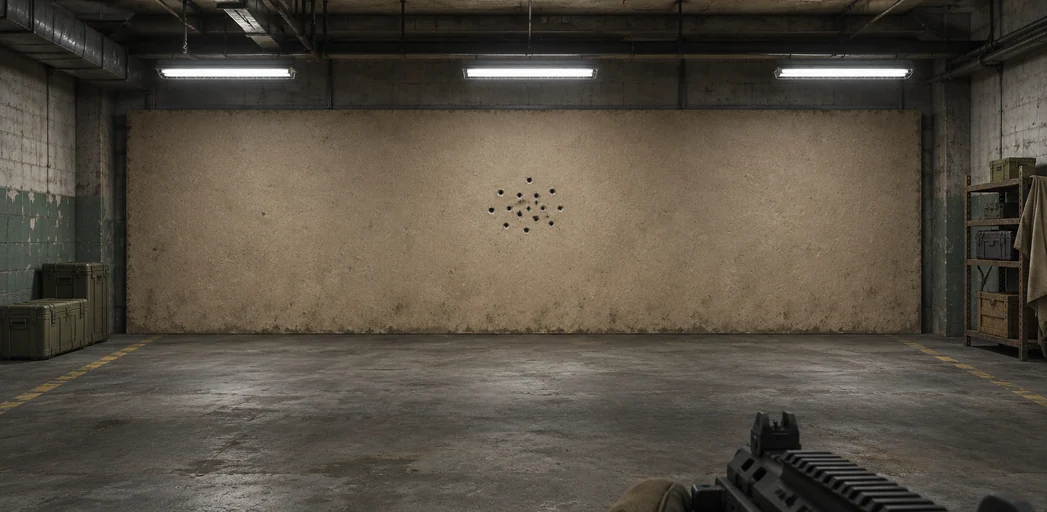
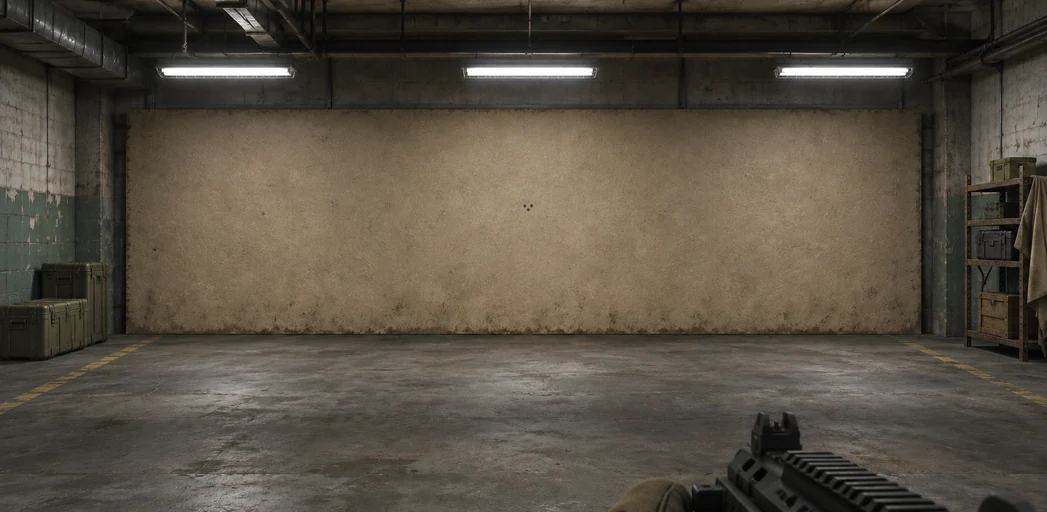
Escape from Tarkov before and after

Escape from Tarkov illustration: without recoil compensation, hits spread across the wall.
Before — without a macro
Escape from Tarkov illustration: with recoil compensation, hits form a compact group.
After — with a macro

About the game

In Escape from Tarkov, finding loot is only part of the job: you still have to reach extraction. Before a raid, you prepare equipment, ammunition and medical supplies. On the map, you decide whether to keep searching for valuables or head for the exit. Dying can cost you some of the equipment you brought into the raid.

Weapons are assembled from compatible parts. Stocks, handguards, sights and muzzle attachments let you prepare a rifle for different tasks. A raid through narrow corridors and a trip across open terrain may call for different builds, even with the same base weapon.

What you need to use macros

First, choose the mouse you need a macro for.

Choose for your Tarkov build

An adjustable version lets you tune compensation strength for your attachments and sight. Check the product page for EFT or Arena support.

Macro suitability
Editorial rating by mouse type and launch conditions.

G HUB

A Logitech macro is a Lua script (.lua). Select the correct profile in G HUB, click Create a new Lua script and load the file.

Bloody 7 and WorkShop 8

For an .amc file, follow the guide for your mouse software. If you received an .mgn file, open the section for that format in the Bloody 7 guide.

Oscar Editor

Open the .amc file in the Oscar Editor for your X7 model. Assign the macro to a button and save the settings using Download to Mouse.

Razer Synapse

Compare your Synapse version with the macro description. Add the .xml file through the Macro module, then assign it to a button and choose a playback mode.

There is currently no catalogue offer for this game and mouse.

Windows application

This game is not yet available in the application for all mice.

Supported games

  • Rust
  • Counter-Strike 2
  • PUBG (PC)
  • Apex Legends
  • THE FINALS

Why choose us

Macros for your in-game settings

Choose a ready-made macro for your usual sensitivity, or a pack where adjustment is included in the price. With a suitable option, you can keep your game settings without placing a separate custom order.

Support

If you have trouble with a purchased macro, contact the seller through your order conversation on Oplata.info. We can help you find where to import the file and what to check if the result differs from what you expected.

Quality

We match macro movements to the weapon and game settings to reduce the manual correction needed during a burst. Compensation uses mouse input without injecting into the game process. Random spread remains.

Android and MAKCU

Macros run in our Android app, while a MAKCU board sends commands to the gaming PC. You need the board and a compatible phone or tablet with USB OTG. Supported games are listed in the application description.

Guarantee and updates

If the product you receive does not match its description, we will review your case and offer a solution under the shop terms. When a macro version is released for changed recoil, it is available free of charge if those updates are included in your purchase terms.

Reviews from buyers

Reviews are left by customers who placed an order through Digiseller. If you have trouble with a macro, write in your order conversation on Oplata.info. The order number and a description of the problem help us investigate faster.

Why the weapon build matters in Tarkov

A weapon with a familiar stock, grip and optic makes a useful starting point. After changing an attachment, repeat the test before adjusting the setup.

Adjusting compensation strength

An adjustable macro lets you tune mouse movement strength for your build. Check your version’s instructions for the adjustment button and whether the result can be saved.

What to check before buying

Confirm the game mode, mouse model and application that should open the file. Record your sight and sensitivity so you can compare them with the pack requirements.

Macros and cheats in an Escape from Tarkov raid

Recoil correction for a weapon build

Two rifles of the same model may have different attachments and firing behaviour. A macro sends the mouse movements defined in its file. Where manual adjustment is available, movement strength can be tuned to the build.

Player and loot markers

Third-party ESP can label items and raid participants behind closed doors. These markers provide information about a room before it has been inspected.

Macro options
Adjustable strength or a preset for a specific build.
What to record
Weapon, build, sight and sensitivity.
Vertical adjustment
Changes the strength of downward mouse movement.

How compensation adjustment works

EFT and EFT: Arena offers include macros for automatic fire with adjustable vertical movement strength. On Logitech, adjustment may be assigned to G4/G5. Bloody/X7 options may provide strength-adjustment buttons or several files arranged by strength.

Adjust compensation strength to your build. The LMB version activates while you hold the left mouse button. To apply compensation while aiming and firing, choose LMB + RMB and hold both buttons together. Wheel and side-button assignments are listed in the file instructions.

What kind of drift do you see?

First confirm the macro runs

Check automatic fire mode, the selected macro and its activation buttons. Only then assess movement strength.

What to record about your weapon and settings

Record the exact weapon model and installed parts, not just its short name. Include the sight and sensitivity values. If the instructions specify a stance or firing mode, record those as well.

Take screenshots of the build and settings. Note the file name and the buttons for activation, adjustment and stopping. This record makes it easier to restore a working setup or explain a problem to support.

Need a file for a different Tarkov sensitivity? Send a screenshot of your in-game settings and your weapon build with its sight to the seller through your order conversation on Oplata.info. Include the pack name and specify whether it is for Escape from Tarkov or Arena.

What changed and where to start comparing
ChangeFirst check
Different attachmentsCompare with the previous build using the same adjustment value.
A different sightCheck the aiming mode and its sensitivity.
A different fileCompare strength, purpose and activation condition.
Switching to ArenaConfirm support for this mode and setup instead of relying on the EFT name alone.

Files with different strengths

Compare two neighbouring versions for one build

If the pack’s files are arranged by compensation strength, you do not need to rewrite one sequence every time. Keep the same build and automatic fire mode. Find two neighbouring versions: with the weaker one your aim consistently rises; with the stronger one it begins to drop. This brackets the useful range for those conditions.

Which of the two files should you keep?

Compare several identical bursts without changing sensitivity or weapon parts. Assess overall vertical movement rather than a single tight hit. Sideways drift is not a reason to keep increasing downward movement.

Keep the original file and name the working copy after your weapon and build. Keep the other version for comparison as well. If neither fits, consider the adjustment limits of this pack.

Which application should you install the file in?

Logitech G HUB

Open Lua in the scripting section of the selected software profile. Check the master switch separately from the adjustment buttons.

Install in G HUB →

Bloody and X7

Keep strength versions clearly identified in your file library. After assigning a file, save the changes using the editor’s specified command.

Choose Bloody or Oscar →

A mention of Razer or another brand on a general page does not confirm that the EFT file you need is available. Check the specific offer, supported software and execution mode.

Frequently asked questions

Is a universal macro already configured for every weapon?

“Universal” may mean that you can adjust compensation strength manually. Check the description for supported builds and any ready-made versions.

Can downward adjustment remove sideways spread?

No. Adjusting downward movement does not correct sideways drift. The sequence needs the appropriate separate capability.

Will this file work in semi-automatic mode?

Do not assume this for an offer limited to automatic fire. Repeated clicks are a separate feature.

How can I tell whether a new setting helped?

Compare several identical bursts after changing only one setting. One chance hit does not confirm the result.

Search Recoilab

All pages: 56

↑