Games / Point Blank

Recoil and auto-shot macros for Point Blank

Point Blank offers recoil macros and auto-shot sequences. The first define mouse movements during a burst; the second perform a series of button presses. Choose a version for your weapon and learn how to start and stop it before use.

Browse the shop

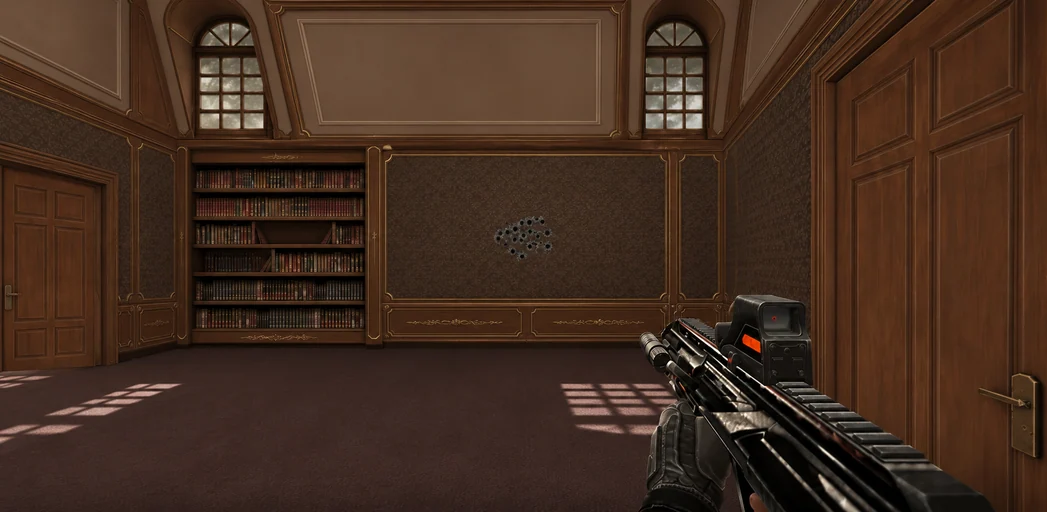
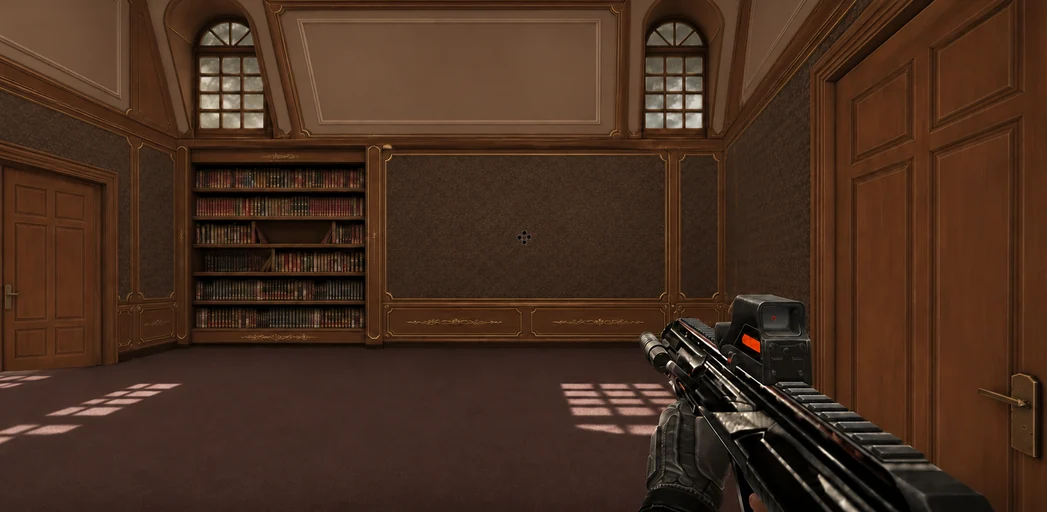
Point Blank before and after

Point Blank illustration: without recoil compensation, hits spread across the wall.
Before — without a macro
Point Blank illustration: with recoil compensation, hits form a compact group.
After — with a macro

About the game

Point Blank is a team shooter where fights quickly move from an open passage to a staircase or a cramped room. Team Deathmatch awards points for eliminating opponents. In bomb mode, you hold the approaches while a teammate plants or defuses the charge.

Your weapon choice depends on the part of the map you want to control. A rifle suits a long sightline, while a shotgun is built for close range. Entering the same room produces different fights depending on whether an opponent waits by the door or holds an angle from the far side.

What you need to use macros

First, choose the mouse you need a macro for.

Point Blank recoil and auto-shot

Choose by action and weapon. Product pages describe automatic-weapon burst macros and auto-shot sequences for individual shots.

Macro suitability
Editorial rating by mouse type and launch conditions.

G HUB

A Logitech macro is a Lua script (.lua). Select the correct profile in G HUB, click Create a new Lua script and load the file.

Bloody 7 and WorkShop 8

For an .amc file, follow the guide for your mouse software. If you received an .mgn file, open the section for that format in the Bloody 7 guide.

Oscar Editor

Open the .amc file in the Oscar Editor for your X7 model. Assign the macro to a button and save the settings using Download to Mouse.

Razer Synapse

Compare your Synapse version with the macro description. Add the .xml file through the Macro module, then assign it to a button and choose a playback mode.

There is currently no catalogue offer for this game and mouse.

Windows application

This game is not yet available in the application for all mice.

Supported games

  • Rust
  • Counter-Strike 2
  • PUBG (PC)
  • Apex Legends
  • THE FINALS

Why choose us

Macros for your in-game settings

Choose a ready-made macro for your usual sensitivity, or a pack where adjustment is included in the price. With a suitable option, you can keep your game settings without placing a separate custom order.

Support

If you have trouble with a purchased macro, contact the seller through your order conversation on Oplata.info. We can help you find where to import the file and what to check if the result differs from what you expected.

Quality

We match macro movements to the weapon and game settings to reduce the manual correction needed during a burst. Compensation uses mouse input without injecting into the game process. Random spread remains.

Android and MAKCU

Macros run in our Android app, while a MAKCU board sends commands to the gaming PC. You need the board and a compatible phone or tablet with USB OTG. Supported games are listed in the application description.

Guarantee and updates

If the product you receive does not match its description, we will review your case and offer a solution under the shop terms. When a macro version is released for changed recoil, it is available free of charge if those updates are included in your purchase terms.

Reviews from buyers

Reviews are left by customers who placed an order through Digiseller. If you have trouble with a macro, write in your order conversation on Oplata.info. The order number and a description of the problem help us investigate faster.

Macros for automatic weapons, shotguns and rifles

For a recoil macro, check aim movement during a burst. For auto-shot, check the order of presses and the delay before the next shot.

Comparing macro behaviour

If the macro controls recoil, compare aim movement over several activations. If it performs clicks, check their order. Start each test from the same position.

What you need for installation

Choose a file for your mouse model and editor. If the software writes settings to mouse memory, check the button assignment and selected mode after saving.

Auto-shot, macros and cheats in Point Blank

An auto-shot sequence

An auto-shot file in a mouse editor can play specific presses and delays at your command. For example, a shotgun sequence defines an action order triggered by an assigned button.

Interfering with weapon behaviour

A cheat may try to change the delay between shots set by the game. In that case, the tool interferes with the game’s fire-rate calculation.

Your choice
Compensation or a firing sequence.
For movement
Weapon, sight and sensitivity.
For presses
Event order, delays and stopping behaviour.

Which weapon do you need a sequence for?

Choose a recoil macro

If you use an AUG, find an AUG macro. Check the description for sensitivity and aiming mode.

Macros for automatic weapons

Choose a ready-made macro for the AUG or another weapon, or a file with adjustable strength. Check sensitivity requirements for a preset file. For an adjustable one, check which settings can be changed and which buttons control them.

If the pack separates hip fire and aiming down sights, use the appropriate version. When changing mode, check the macro version and sensitivity for that sight. Note the mode alongside the file name to avoid mixing up assignments.

To change the sensitivity of a ready-made Point Blank pack, send the seller a screenshot of your in-game mouse settings through your order conversation on Oplata.info. Include the file name, weapon and firing mode you need the macro adjusted for.

How auto-shot works

Shotgun and bolt-action rifle offers may include versions with different delays. This does not mean the shortest cycle suits every weapon. Every event between the start and end of the sequence matters.

Before use, find out how to interrupt the cycle and what happens when you press again. In run-once mode, a macro may finish the entire cycle after a brief click; hold and toggle modes behave differently. Do not test an unfamiliar sequence until you know how to return to normal controls.

A macro does not remove limits imposed by the game itself. “Faster” in a name is no substitute for a description of supported conditions and a test of the actual result.

Testing auto-shot

The first activation works, but the next one is missed

Suppose the first shotgun auto-shot runs as expected, but the next shot is missed while you keep holding the button. This is not a complete macro failure: the difference appeared on repeat. Auto-shot packs may offer different speeds; compare the full cycle rather than only the first shot.

How to check repeated shots

Run separate activations with a clear pause, then try a short and a longer hold. Keep the weapon and button assignment unchanged. Note which repeat is missed and whether the previous action had finished.

If separate cycles work but consecutive cycles behave differently, check the playback mode and the available delay versions. There may be extra presses in the sequence: increasing an arbitrary interval does not guarantee a fix.

What to compare before installation

Checking a Point Blank file
ItemWhat should be clear
PurposeAim movement, repeated clicks or a complete firing sequence.
Weapon and modeThe exact name, aiming mode and applicable conditions.
SettingsSensitivity or the available delay versions.
EditorThe correct format and support for your specific mouse.
ControlsStarting, stopping and returning to normal button functions.

Also account for the game version and regional client. An old archive name or a label for another region does not prove that all conditions match.

Completing installation

For Logitech, Lua runs through a G HUB software profile. In Bloody and X7, check the library, selected button and application of settings. For Razer, first check the Synapse version, then the import and playback mode.

If the macro does not activate at all, check its switch and the active editor profile. If commands run but the result differs from what you expect, compare the weapon, file purpose and delays with the instructions.

G HUB · Bloody · X7 · Razer

Frequently asked questions

Does auto-shot replace a recoil macro?

No. It may perform a different sequence. The actions must be explicitly listed in the file description.

Should I choose the fastest version?

Choose based on the weapon and operating conditions. Delays that are too short may not suit your sequence. Also check how to stop playback.

Why does the button behave as before after importing?

Check the assignment, active profile and whether the settings were saved in the software or to the device. Importing into a library does not complete installation.

Search Recoilab

All pages: 56

↑