Games / FragPunk

FragPunk recoil macros with sensitivity options

First test a FragPunk macro at the practice range with a familiar weapon and sight. Then compare firing in a round with active cards. This helps distinguish a macro setting from a card effect.

Browse the shop

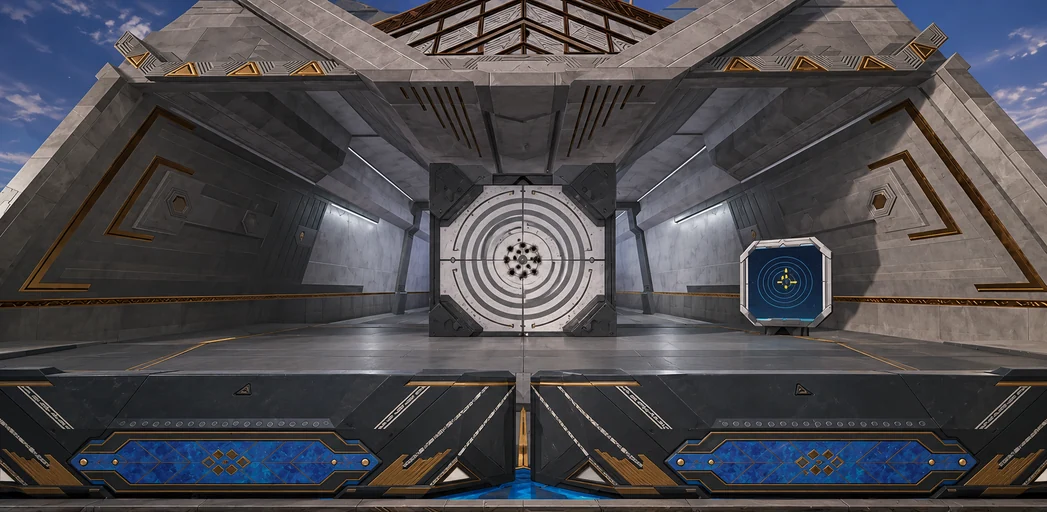
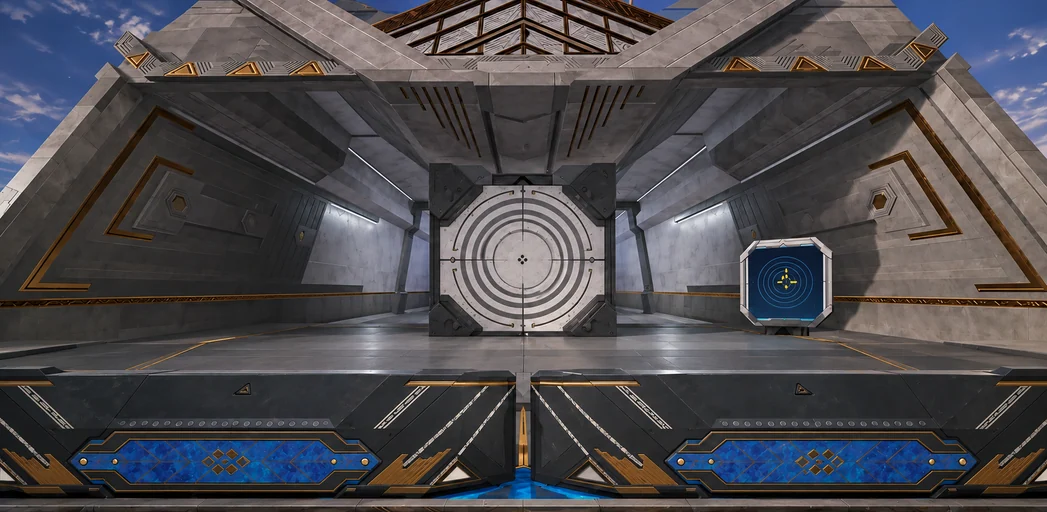
FragPunk before and after

FragPunk illustration: without recoil compensation, hits spread across the wall.
Before — without a macro
FragPunk illustration: with recoil compensation, hits form a compact group.
After — with a macro

About the game

In FragPunk, teams of five choose heroes with individual abilities and play out rounds. In Shard Clash, attackers carry the converter to a plant site while defenders try to stop them. Before a round begins, the team can choose Shard Cards.

Cards change the rules for a round. One effect might add an extra jump; another changes bullet behaviour. They let a team approach a familiar site differently, while their opponents must account for the advantage on the other side.

What you need to use macros

First, choose the mouse you need a macro for.

FragPunk files and packs

The catalogue includes individual weapon files and packs. Compare look-sensitivity values with the settings you use.

Macro suitability
Editorial rating by mouse type and launch conditions.

G HUB

A Logitech macro is a Lua script (.lua). Select the correct profile in G HUB, click Create a new Lua script and load the file.

Bloody 7 and WorkShop 8

For an .amc file, follow the guide for your mouse software. If you received an .mgn file, open the section for that format in the Bloody 7 guide.

Oscar Editor

Open the .amc file in the Oscar Editor for your X7 model. Assign the macro to a button and save the settings using Download to Mouse.

Razer Synapse

Compare your Synapse version with the macro description. Add the .xml file through the Macro module, then assign it to a button and choose a playback mode.

Windows application

This game is not yet available in the application for all mice.

Supported games

  • Rust
  • Counter-Strike 2
  • PUBG (PC)
  • Apex Legends
  • THE FINALS

Why choose us

Macros for your in-game settings

Choose a ready-made macro for your usual sensitivity, or a pack where adjustment is included in the price. With a suitable option, you can keep your game settings without placing a separate custom order.

Support

If you have trouble with a purchased macro, contact the seller through your order conversation on Oplata.info. We can help you find where to import the file and what to check if the result differs from what you expected.

Quality

We match macro movements to the weapon and game settings to reduce the manual correction needed during a burst. Compensation uses mouse input without injecting into the game process. Random spread remains.

Android and MAKCU

Macros run in our Android app, while a MAKCU board sends commands to the gaming PC. You need the board and a compatible phone or tablet with USB OTG. Supported games are listed in the application description.

Guarantee and updates

If the product you receive does not match its description, we will review your case and offer a solution under the shop terms. When a macro version is released for changed recoil, it is available free of charge if those updates are included in your purchase terms.

Reviews from buyers

Reviews are left by customers who placed an order through Digiseller. If you have trouble with a macro, write in your order conversation on Oplata.info. The order number and a description of the problem help us investigate faster.

What FragPunk cards add

The practice range lets you compare bursts under familiar conditions. Card effects in a round can change weapon behaviour, so assess those two situations separately.

A macro for your weapon

Match the weapon name to the macro list in the pack. If a card changes firing conditions, compare bursts before and after its effect using the same weapon and sensitivity.

What to check in a pack

Find the supported weapons, sensitivity, sight and editor. Check separately how the sequence stops when reloading or releasing the button.

How macros and cheats work in FragPunk

Recorded input in a round with cards

A weapon sequence defines a series of mouse movements. A card effect can change round conditions, while the recording is prepared for specific settings and weapon behaviour. Commands still arrive in their recorded order.

Hints about opponent positions

A third-party tool can display extra markers for hidden opponents. For example, it may reveal which side an opponent is approaching a site from during a round.

In the catalogue
Individual macros and packs for several weapons.
How files differ
Actions, sensitivity and format.
What changes in the game
Round conditions and active cards.

Which weapons does a pack support?

FragPunk has individual macros and packs covering several weapons. Descriptions may list names such as Ghost Pepper, Clampdown, My Way and Discipline. Match the exact name to your weapon and the contents of the product you choose.

An “8 in 1” label describes the offer contents. It does not mean the file automatically detects a picked-up weapon, active cards or every loadout. The instructions should explain how switching works.

What changed before your test?

Choose a macro for the new weapon

Match the weapon name to the pack and check how to select its macro. Check the master switch separately.

A recoil macro or a clicker?

Aim movement

The sequence defines movements with specific delays. Direction, duration and activation conditions matter when evaluating it.

Repeated presses

A clicker plays a series of button events. Check the repeat count, intervals and stopping method; it does not remove the game’s own limits.

If a file combines compensation and clicks, read the order in which they run. Then select the specified playback mode. In run-once mode, even a brief click can start the whole cycle.

Transitions between actions

Firing works, but a shot is missed after reloading

In the FragPunk update dated July 9, 2026, the developers changed when the Boom Broom, My Way and Vicious become ready to fire after reloading. This is an example of a change to the transition into a shot, rather than to the entire recoil pattern.

How to test a sequence that includes reloading

First wait manually until the weapon is ready, then run only the firing sequence. Compare that with the complete sequence. If the file supports both cases, record empty- and partial-magazine reloads separately: the conditions may differ.

A difference between these tests is a reason to examine the delay and action order at the transition. Do not change all compensation because the beginning was missed once. Check your file description for automatic reloading and support for the required weapon.

Allowing for card effects

The developer’s description of Shard Cards highlights how they change round conditions. Account for the active effect when comparing firing. Bursts with different cards are not performed under the same conditions.

  1. Keep the starting settingsRecord sensitivity, weapon, mode and file name.
  2. Check the assignmentMake sure the intended sequence is enabled and you know how to stop it.
  3. Record round conditionsNote effects that may influence the action you are testing.
  4. Repeat the comparisonChange one setting at a time and compare several identical bursts.

Do not choose a new value based on one successful result. A macro does not predict random spread or track a target for the player.

Finding the right file after purchase

Extract the archive first and separate the versions for different editors. Folders with the same weapon name may contain different formats. Keep the original pack unchanged and label your working file so that its weapon and setting are clear.

If the combination you need is missing, check the product contents. Do not run a file for another weapon because it seems “close enough”, or assume a list of brands guarantees compatibility with every model.

Frequently asked questions

Does a pack detect the active card automatically?

Only if recognition is explicitly listed as an application feature. An ordinary file executes predefined commands and does not detect the active card by itself.

How does a single macro differ from a pack?

A single macro is prepared for a specific weapon and settings. For a pack, check the supported weapons and sensitivity versions.

My FragPunk pack has no file for my sensitivity. What should I do?

First check whether your pack supports adjustment. If you need a separate file, take a screenshot of look sensitivity in FragPunk and send it to the seller through your order conversation on Oplata.info. Name the weapon and pack you need the version for.

Search Recoilab

All pages: 56

↑