Games / Valorant

Valorant macros for short bursts and quickscoping

In Valorant, a macro can perform different actions: compensate for the start of a burst, repeat clicks or control scoping. Choose the action you need, then check the weapon and file activation requirements. Below, you can calculate eDPI and compare sensitivity when changing DPI.

Browse the shop

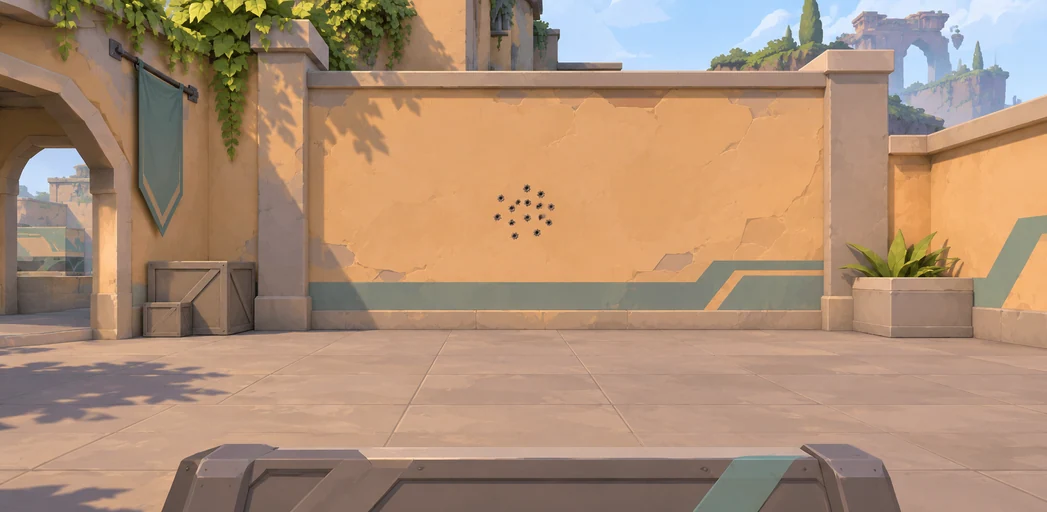
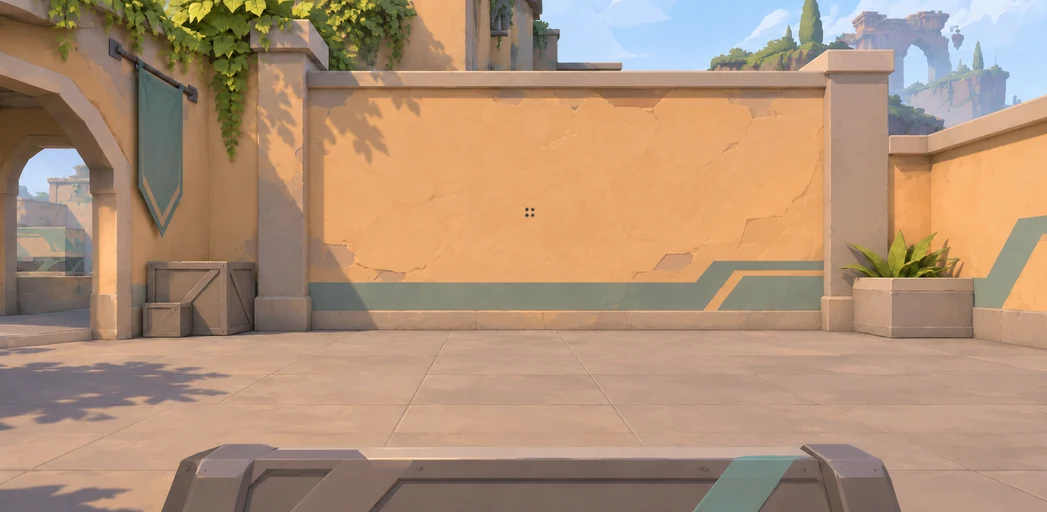
Valorant before and after

Valorant illustration: without recoil compensation, hits spread across the wall.
Before — without a macro
Valorant illustration: with recoil compensation, hits form a compact group.
After — with a macro

About the game

In Valorant, teams of five take turns attacking and defending sites. In competitive play, attackers plant the Spike, while defenders can prevent the plant or defuse it. Weapons are bought for each round, and every agent has a distinct set of abilities.

Abilities help set up plays for the whole team. One agent smokes a distant passage while another checks behind cover. This gives teammates time to enter the site and take positions before the defenders can reorganise.

What you need to use macros

First, choose the mouse you need a macro for.

Valorant files

Check the description for the weapon and in-game sensitivity. Choose between an automatic-burst pack and a quickscope macro according to the action you need.

Macro suitability
Editorial rating by mouse type and launch conditions.

G HUB

A Logitech macro is a Lua script (.lua). Select the correct profile in G HUB, click Create a new Lua script and load the file.

There is currently no catalogue offer for this game and mouse.

Bloody 7 and WorkShop 8

For an .amc file, follow the guide for your mouse software. If you received an .mgn file, open the section for that format in the Bloody 7 guide.

Oscar Editor

Open the .amc file in the Oscar Editor for your X7 model. Assign the macro to a button and save the settings using Download to Mouse.

Razer Synapse

Compare your Synapse version with the macro description. Add the .xml file through the Macro module, then assign it to a button and choose a playback mode.

There is currently no catalogue offer for this game and mouse.

Windows application

This game is not yet available in the application for all mice.

Supported games

  • Rust
  • Counter-Strike 2
  • PUBG (PC)
  • Apex Legends
  • THE FINALS

Why choose us

Macros for your in-game settings

Choose a ready-made macro for your usual sensitivity, or a pack where adjustment is included in the price. With a suitable option, you can keep your game settings without placing a separate custom order.

Support

If you have trouble with a purchased macro, contact the seller through your order conversation on Oplata.info. We can help you find where to import the file and what to check if the result differs from what you expected.

Quality

We match macro movements to the weapon and game settings to reduce the manual correction needed during a burst. Compensation uses mouse input without injecting into the game process. Random spread remains.

Android and MAKCU

Macros run in our Android app, while a MAKCU board sends commands to the gaming PC. You need the board and a compatible phone or tablet with USB OTG. Supported games are listed in the application description.

Guarantee and updates

If the product you receive does not match its description, we will review your case and offer a solution under the shop terms. When a macro version is released for changed recoil, it is available free of charge if those updates are included in your purchase terms.

Reviews from buyers

Reviews are left by customers who placed an order through Digiseller. If you have trouble with a macro, write in your order conversation on Oplata.info. The order number and a description of the problem help us investigate faster.

What to test in the Valorant Range

A short burst at a wall shows how the opening hits behave. Test a longer burst separately at the same distance.

Recoil macros, clickers and quickscoping

A recoil macro moves the mouse during firing. A clicker repeats presses, while a quickscope macro performs aiming and firing. The description explains the purpose of each file.

What you need for setup

Check the macro format, activation mode and required Valorant sensitivity. The eDPI calculator below helps compare manual aiming speed at different DPI values.

Macros and triggerbots in Valorant

Activation by the player

A Vandal macro plays prerecorded mouse movements after an activation command. A clicker follows the same principle, repeating presses with defined delays.

Firing at a detected target

A triggerbot can issue a fire command when it detects an opponent in the crosshair. The timing depends on events in the match, such as an opponent moving into the line of aim.

Sequence type
A burst, repeated clicks or quickscoping.
What to compare
Weapon, aiming mode and sensitivity.
Calculator below
Compares aiming movement after a DPI change; it does not edit a macro.

Which action do you need the file for?

An aim-movement pattern

Look for the weapon and the part of the burst the sequence covers. A setup for the opening shots does not imply the same result across a full magazine.

Choosing a macro for your weapon and aiming mode

Valorant packs may include separate macros for different weapons, hip fire and aiming down sights. The LMB version activates while you hold the left mouse button. If the pack includes an LMB + RMB version, it applies compensation only while both buttons are held.

If you switch from a Phantom to a Vandal, choose a Vandal macro. The fire rate and required mouse movement may change along with the weapon. A repeated-click sequence for semi-automatic fire also needs the correct assignment. A macro does not remove the game’s fire-rate limits.

Sequence length

Ares, Odin and Guardian: what to check in each file

Test a macro intended for the opening shots with a short burst. For a longer-burst file, compare what happens at the end as well. For example, there are 30-shot Ares and Odin versions, and a three-click Guardian cycle with aim return. These are conditions of specific files, not a universal standard for Valorant macros.

How to test short- and long-burst macros

Start with the part described in the file instructions. If a sequence covers the beginning of a burst, emptying the magazine will not tell you how well it performs that particular task. For a looping sequence, compare the first cycle with the transition into the next one: the opening hits alone cannot reveal drift between cycles.

Before choosing, define the task: sustained Odin fire or several repeated Guardian clicks. Even with the same sensitivity, these require different sequences.

Choosing a file for your mouse

Bloody/X7 files may use AMC or other formats supported by their editors. Choose the software for your exact model and save the assignment to the device as instructed. Razer requires a version for the appropriate Synapse release.

A mention of Logitech in a general shop heading does not confirm that a working G HUB version exists for Valorant. Check the specific offer and current launch requirements before changing your mouse or buying a file.

Bloody 7 · X7 Oscar Editor · Razer Synapse

Keep a familiar aiming speed when changing DPI

The calculator suggests a new sensitivity that keeps DPI multiplied by Valorant sensitivity unchanged. Use it to compare settings after a DPI change. It does not modify the macro file or scope multipliers.

Your eDPI

280

Sensitivity at the new DPI: 0.175

How to use the calculation

You can use any DPI setting on your mouse; it will not affect how the macro works. If a macro requires a specific Valorant sensitivity, use the in-game value from its instructions. You can then adjust your manual aiming speed through your mouse DPI.

Keep your original values, check the active profile and compare several identical bursts. Assess the opening shots and the rest of the burst separately. Recorded movements do not predict random shot spread.

Frequently asked questions

Will one file work for an automatic rifle and the Operator?

They usually need different files. Burst compensation and quickscoping use different actions.

Does the calculator choose a macro automatically?

No. It calculates eDPI and a new sensitivity for a DPI change. File compatibility depends on its instructions.

How do I aim with an LMB + RMB macro?

Hold the right mouse button while firing. If you currently toggle aiming with one press, hold-to-aim is more convenient for this macro.

How can I request a Valorant pack for my sensitivity?

For a ready-made macro, use the value given in its instructions. If you want to keep your usual sensitivity, take a screenshot of your mouse settings in Valorant. Send it to the seller through your order conversation on Oplata.info and specify which pack needs adjusting. For scoped fire, include the relevant multiplier too.

Search Recoilab

All pages: 56

↑