Games / The Finals

Recoil macros for the AKM, FCAR and other THE FINALS weapons

Choose a THE FINALS macro for your main weapon or a pack covering several weapons. Check which macros are included and how to switch between them. After a game update, test again with a familiar weapon.

Browse the shop

THE FINALS before and after

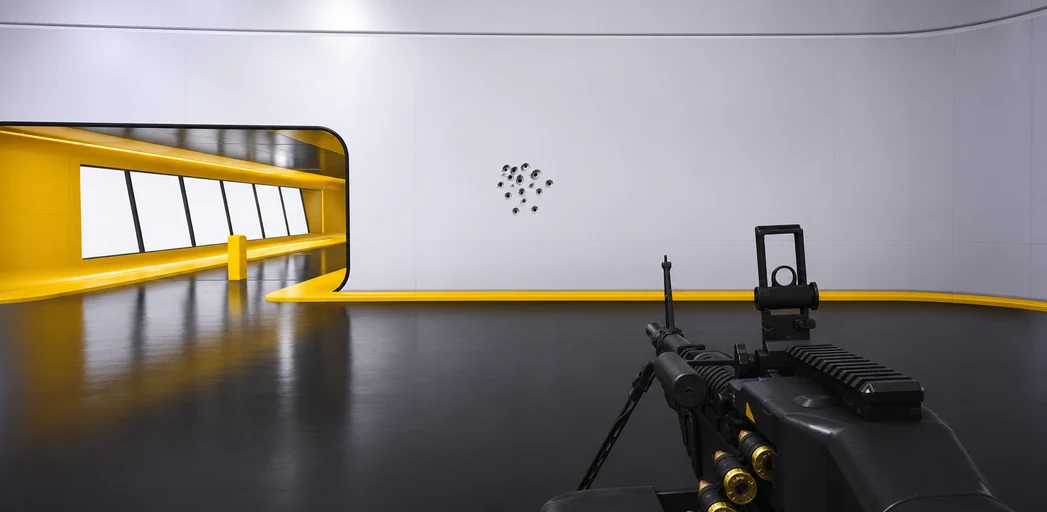
THE FINALS illustration: without recoil compensation, hits spread across the wall.
Before — without a macro
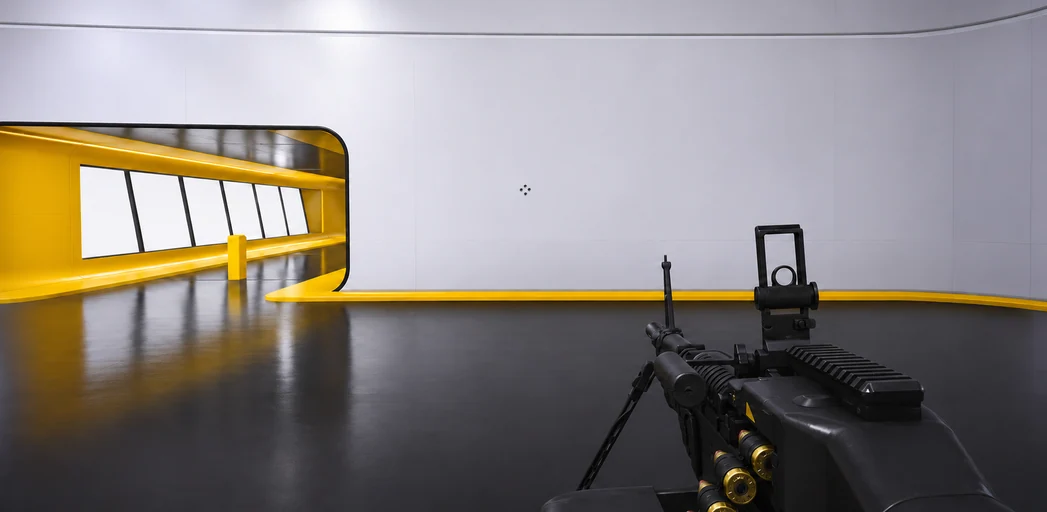
THE FINALS illustration: with recoil compensation, hits form a compact group.
After — with a macro

About the game

THE FINALS arenas are staged like a game show. In Cashout, a team takes a cash box from a vault, carries it to a cashout station and holds it until the countdown ends. Opponents can steal the cashout while the timer is running.

The arena can change during the fight. If a staircase is blocked, breaking through a wall or floor may open a better route. Light, Medium and Heavy contestants have different equipment, and their combination shapes how the team approaches the station.

What you need to use macros

First, choose the mouse you need a macro for.

THE FINALS packs

Find your class and weapon in the description. A weapon may have versions for normal firing and for activation while holding aim.

Macro suitability
Editorial rating by mouse type and launch conditions.

G HUB

A Logitech macro is a Lua script (.lua). Select the correct profile in G HUB, click Create a new Lua script and load the file.

Bloody 7 and WorkShop 8

For an .amc file, follow the guide for your mouse software. If you received an .mgn file, open the section for that format in the Bloody 7 guide.

Oscar Editor

Open the .amc file in the Oscar Editor for your X7 model. Assign the macro to a button and save the settings using Download to Mouse.

Razer Synapse

Compare your Synapse version with the macro description. Add the .xml file through the Macro module, then assign it to a button and choose a playback mode.

Windows application

After buying a key, sign in to your account and download the application. The product page lists connection methods and explains when a MAKCU board is required.

The application supports THE FINALS. If the game is not listed in the key description, confirm access terms before paying. Ask about the key

Supported games

  • Rust
  • Counter-Strike 2
  • PUBG (PC)
  • Apex Legends
  • THE FINALS

Why choose us

Macros for your in-game settings

Choose a ready-made macro for your usual sensitivity, or a pack where adjustment is included in the price. With a suitable option, you can keep your game settings without placing a separate custom order.

Support

If you have trouble with a purchased macro, contact the seller through your order conversation on Oplata.info. We can help you find where to import the file and what to check if the result differs from what you expected.

Quality

We match macro movements to the weapon and game settings to reduce the manual correction needed during a burst. Compensation uses mouse input without injecting into the game process. Random spread remains.

Android and MAKCU

Macros run in our Android app, while a MAKCU board sends commands to the gaming PC. You need the board and a compatible phone or tablet with USB OTG. Supported games are listed in the application description.

Guarantee and updates

If the product you receive does not match its description, we will review your case and offer a solution under the shop terms. When a macro version is released for changed recoil, it is available free of charge if those updates are included in your purchase terms.

Reviews from buyers

Reviews are left by customers who placed an order through Digiseller. If you have trouble with a macro, write in your order conversation on Oplata.info. The order number and a description of the problem help us investigate faster.

What changes between THE FINALS matches

Changing equipment changes the pace and length of a burst. Keep one familiar setup available for comparison and return to it after updates.

A single-weapon macro or a pack

If you often change equipment, check that the pack includes macros for the weapons you need. Read how to select each version and confirm that it is enabled.

Conditions for your first test

Compare mouse software, weapon and scope magnification with the macro description. Repeat the same burst in the practice area until you can distinguish setting changes from uneven visuals.

Macros and cheats in THE FINALS matches

A predefined FCAR burst

An FCAR file sends movements on a fixed schedule after activation. Changing weapons changes the burst timing and aim behaviour that the recording was prepared for.

Silhouettes in a destructible building

Third-party highlighting can show opponents through walls that are still intact. The squad learns where the opponents are before destroying the obstacle or entering the room.

Choosing a pack
A macro for one weapon or a pack for several.
After a patch
Test the specific sequence again.
Keep these separate
Aim movement and uneven frame delivery.

How do you choose your loadout?

Choose a macro for your weapon

Compare the weapon name, sensitivity and activation method with the file description.

What is included in a THE FINALS pack?

THE FINALS macros are available for the AKM, FCAR, M60, Lewis Gun, XP-54, M11 and other weapons. Compare the in-game sensitivity and check which versions are included for your mouse. The LMB version activates while you hold the left button. In the LMB + RMB version, compensation starts when both buttons are held at the same time.

When choosing a pack, look beyond the number of items. You need clear file names, assignment instructions and a way to select the correct weapon. If there are several versions for one mouse model, find out whether they differ in settings, aiming mode or mouse software.

If you want a purchased pack adjusted to your THE FINALS sensitivity, take a screenshot showing look and zoom values. Send it to the seller through your order conversation on Oplata.info and name the weapon and pack you use.

Weapon behaviour

ShAK-50: ammunition and macro commands are counted differently

Embark’s description of the ShAK-50 specifies two bullets per shot. Ammunition used therefore does not, on its own, tell you how many presses or movements a file should contain. The ShAK-50 needs a sequence prepared for that weapon.

When comparing recordings, clarify what one step means: an in-game action, a time interval or a mouse movement. This depends on how the sequence is built. The same number of lines does not make two files equivalent.

What to record when checking this kind of sequence

Make a short screen recording with the ammo counter visible and note when activation occurs. Compare the start, duration and stop. Wall impacts alone are not enough: hits may overlap, and they do not reveal the file’s internal logic.

A weapon update may affect only part of a burst

Macro update notes may describe a completely revised sequence or changes limited to the opening section. The year in an archive name does not tell you which part was revised.

If the start now differs but the rest looks similar, do not try to fix the entire sequence by increasing its strength. Keep the previous file, a settings screenshot and a short description of when the deviation appears, with which weapon and under what conditions.

Test the new version with the same class, weapon, sensitivity and optic. This makes it easier to see what changed after replacing the file.

How long does one frame take?

Camera movement can feel different when frame delivery is uneven. The slider shows only the calculated duration of one frame, not measured latency on your system.

Time per frame: 6.94 ms

Installing the macro for your mouse

  1. Choose your mouse softwareUse software compatible with your exact mouse model.
  2. Import the correct versionLua, AMC and XML use different import methods. Extract RAR or ZIP archives first.
  3. Assign and saveCheck the editor profile, button assignment and whether you need to save in the software or to the device.
  4. Check how to stop the macroRun-once mode differs from hold and toggle modes. Understand this behaviour before proceeding.

Do not assume every Razer macro can be saved to onboard memory. This depends on the mouse model and the events used. More about importing and memory →

Frequently asked questions

Do I need a full pack if I only use one weapon?

A matching macro is enough for one weapon. If you are considering a pack, check that it includes the weapon and that the settings suit you.

Does a recoil reduction in a patch improve an old macro?

Not necessarily. The old compensation may become too strong or match only part of the burst. Test it again with the same settings.

Does the calculator measure mouse latency?

No. It divides 1000 ms by the FPS value you enter. It does not measure input, network, processing or display latency.

Search Recoilab

All pages: 56

↑