Games / PUBG Mobile

PUBG Mobile macros for an emulator on PC

If you play PUBG Mobile through an emulator, set up normal mouse controls first. Then choose a macro for your game version, weapon, scope and sensitivity. This makes it easier to tell whether a problem comes from the file or the emulator’s keymapping.

Browse the shop

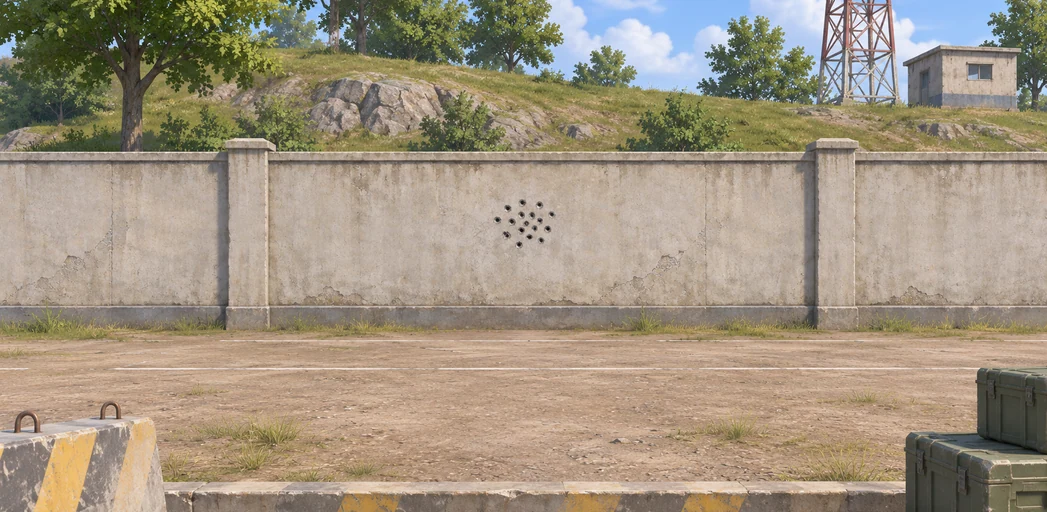
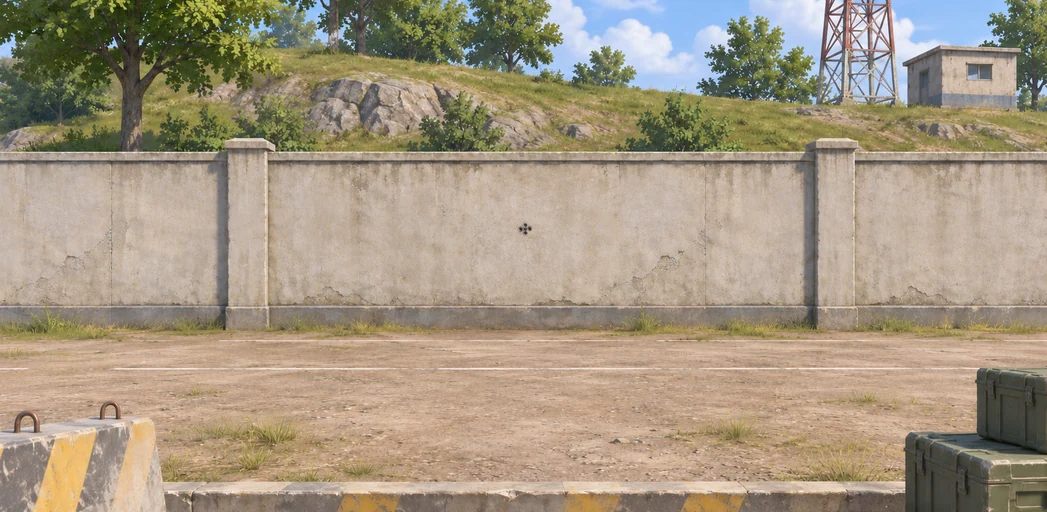
PUBG Mobile before and after

PUBG Mobile illustration: without recoil compensation, hits spread across the wall.
Before — without a macro
PUBG Mobile illustration: with recoil compensation, hits form a compact group.
After — with a macro

About the game

PUBG Mobile combat controls are designed for a touchscreen. Fire, aim and stance buttons can be placed where they are comfortable to reach. In Classic mode, players land on a map, gather equipment and move with the safe zone.

Arena has a different pace. Four-on-four team play offers frequent firefights and a quicker way to get used to button placement. In battle royale, a comfortable layout is especially useful when you need to change sights, reach cover or pick up equipment quickly.

What you need to use macros

First, choose the mouse you need a macro for.

PUBG Mobile macros on PC

Check the emulator and keymapping first. With adjustable Logitech Lua, compensation strength is tuned for the required weapon.

Suitability for PUBG Mobile Lite
Editorial rating by mouse type and launch conditions.

G HUB

A Logitech macro is a Lua script (.lua). Select the correct profile in G HUB, click Create a new Lua script and load the file.

This section includes a universal macro with compensation adjusted manually for the required weapon.

Bloody 7 and WorkShop 8

For an .amc file, follow the guide for your mouse software. If you received an .mgn file, open the section for that format in the Bloody 7 guide.

There is currently no catalogue offer for this game and mouse.

Oscar Editor

Open the .amc file in the Oscar Editor for your X7 model. Assign the macro to a button and save the settings using Download to Mouse.

There is currently no catalogue offer for this game and mouse.

Razer Synapse

Compare your Synapse version with the macro description. Add the .xml file through the Macro module, then assign it to a button and choose a playback mode.

There is currently no catalogue offer for this game and mouse.

Windows application

This game is not yet available in the application for all mice.

Supported games

  • Rust
  • Counter-Strike 2
  • PUBG (PC)
  • Apex Legends
  • THE FINALS

Why choose us

Macros for your in-game settings

Choose a ready-made macro for your usual sensitivity, or a pack where adjustment is included in the price. With a suitable option, you can keep your game settings without placing a separate custom order.

Support

If you have trouble with a purchased macro, contact the seller through your order conversation on Oplata.info. We can help you find where to import the file and what to check if the result differs from what you expected.

Quality

We match macro movements to the weapon and game settings to reduce the manual correction needed during a burst. Compensation uses mouse input without injecting into the game process. Random spread remains.

Android and MAKCU

Macros run in our Android app, while a MAKCU board sends commands to the gaming PC. You need the board and a compatible phone or tablet with USB OTG. Supported games are listed in the application description.

Guarantee and updates

If the product you receive does not match its description, we will review your case and offer a solution under the shop terms. When a macro version is released for changed recoil, it is available free of charge if those updates are included in your purchase terms.

Reviews from buyers

Reviews are left by customers who placed an order through Digiseller. If you have trouble with a macro, write in your order conversation on Oplata.info. The order number and a description of the problem help us investigate faster.

How a mouse controls PUBG Mobile

In an emulator, mouse movements are converted into mobile control commands. Cursor capture and on-screen button mapping affect how the game receives input.

When to start configuring the macro

Test the macro after the mouse controls the camera and the aim and fire buttons work. It is then easier to tell whether a deviation comes from the macro or emulator keymapping.

What to check on your PC

Confirm the PUBG Mobile version, emulator and mouse editor. Save working control settings so you can restore the original setup after experimenting.

Emulator input and cheats in PUBG Mobile

Mouse movements through GameLoop

A Logitech Lua script sends predefined mouse movements on a PC. When PUBG Mobile runs through GameLoop, the game processes this input using the emulator’s keymapping. In an adjustable file, movement strength is tuned manually for the chosen weapon.

A modified game client

A modified third-party app build may add hints about hidden opponents to the PUBG Mobile interface. These changes provide additional information about events on the map.

Environment
A phone or a Windows emulator.
Before importing
Working mouse and keyboard controls.
Game version
PUBG Mobile, Mobile Lite or PUBG for PC.

Where are you running the game?

Check emulator controls

Set up cursor capture, aiming and firing first. Then check the weapon, sensitivity and file requirements.

Set up the mouse in your emulator first

GameLoop supports PUBG Mobile on PC with mouse and keyboard controls. Emulator keymapping is a separate part of setup: importing a macro into G HUB or Oscar does not create in-game control assignments.

  1. Check cursor captureMake sure you know how to switch between camera control and a free pointer.
  2. Check aiming and firingEach button should perform its expected action before you enable a sequence.
  3. Save the keymappingRecord the window mode and any settings required by the instructions.
  4. Move on to the fileOnly then can you meaningfully assess the macro’s movements and delays.

GameLoop controls

Check on-screen buttons after changing the HUD

If you move the fire button in PUBG Mobile, check that it still matches the emulator’s keymapping. In the GameLoop guide, mappings are placed over in-game controls. Your Lua or AMC file may be unchanged while an action no longer reaches the correct button.

What to check before editing the macro

Disable the sequence and test normal firing. In the control editor, align the mapping with the on-screen button, save the layout and test again. After a resolution change, compare the result with the previous window mode.

Installing from an external APK is a separate case. GameLoop’s keymapping help page notes that required control files may be missing. Check installation through GameCenter: changing macro movement does not add a missing layout.

Macros for PUBG Mobile weapons

PUBG Mobile packs may include macros for the AKM, M416, M762, Groza and DP-28. Compare the weapon list with the description of your chosen product. A matching weapon name in PC PUBG does not make the sequences interchangeable.

Compare the scope, firing mode and sensitivity with your file instructions. They may also specify emulator window size and frame rate. Settings from another pack do not automatically apply.

If you need help adjusting a macro after changing PUBG Mobile sensitivity, open the sensitivity settings inside the game and take a screenshot of the values for your scope. Send it to the seller through your order conversation on Oplata.info and include the emulator and file name.

Where to look for a problem

Identifying the affected layer
LayerWhat to check
Mouse softwareImport, active profile, button and activation condition.
EmulatorPointer capture, keymapping and transmission of the required action.
PUBG MobileWeapon, scope, sensitivity and firing conditions.

If the cursor stays free and you cannot control the camera, do not change the file’s movement pattern. If normal controls work but the sequence produces no movement, check the editor and activation. This order helps keep different causes separate.

Which format does your mouse need?

Open Logitech Lua in G HUB, compatible AMC files in the appropriate Bloody or X7 editor, and Razer XML in the correct Synapse version. Using an emulator does not let you import any of these formats into any editor.

Find instructions for the file you received →

Frequently asked questions

Can I install a PC Lua file on a phone?

Not as an Android app. Lua for G HUB runs in a compatible PC environment; copying the file does not change that.

Why does the macro work in the editor but not move the camera?

Start with pointer capture and emulator keymapping. Mouse software and passing controls into the game are separate stages.

Will one file work for both Mobile and Lite?

Check the product description. The file must support your game version and how you run it.

Do I need to change all my controls after purchase?

No. Save your familiar setup first, then compare it with the file requirements and change only the necessary settings.

Search Recoilab

All pages: 56

↑