
Select a video to see its audio and subtitle language.
Product description
For Logitech G-series mice, including wireless models.
Logitech and Razer macros can still be used through cloud gaming. They will not work when Rust runs normally through Steam because Rust's developers have blocked G HUB and Synapse. Ways to use macros in Rust: Learn more.
Button combinations:
Combine keyboard keys with mouse buttons.
- ✔ Available keyboard keys:
CTRL, ALT and SHIFT — left and right versions (6 keys in total).
- ✔ Available mouse buttons, using the Logitech G102 as an example:
- G3 — mouse wheel click
- G4 — front side button
- G5 — rear side button
- G6 — DPI button (its DPI function can be disabled in G HUB)
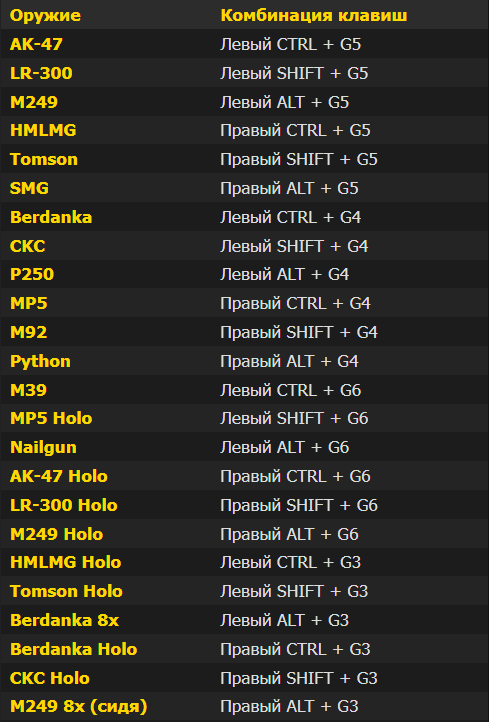
The script supports Logitech G mice with different numbers of extra buttons. More buttons allow more variants to have their own combinations. Specify your preferred keyboard-and-mouse combinations when ordering; examples are shown below.
Example macro bindings:
Logitech G102 example
In the fields provided, enter:
- Your sensitivity
- FOV (field of view)
- Hotkey combinations (optional)
Orders are usually ready within 30 minutes to 1 hour. We will send the finished .lua through the conversation on your oplata.info purchase page. You can also request the file through your Oplata.info order conversation.
Features:
- ✔ Compensation does not activate unless you are aiming (checks that RMB is held)
- ✔ Detects character stance (works both crouching and standing)
- ✔ Movement interval — 1 ms
Additional information
For Logitech G-series mice only.
The macros run through a supported mouse and its software. They simulate mouse movements to compensate for recoil without modifying game files.
For help choosing or configuring a macro, use the order conversation on Oplata.info
Enjoy your game!
Discounts
| Previous purchases from | Discount |
|---|---|
| 200 USD | 30% |
| 100 USD | 25% |
| 50 USD | 20% |
| 30 USD | 15% |
| 15 USD | 10% |
| 5 USD | 5% |